

Email is still the #1 way most businesses talk to customers, suppliers, and partners.
It’s also the #1 place attackers try to impersonate you.
If someone can send an email that looks like it came from your domain, they can:
- Trick customers into paying fake invoices
- Steal passwords with phishing links
- Damage your reputation
- Make your real emails land in spam
That’s exactly the problem White Arrow Technology cyber security email tools is built to solve.
White Arrow Technology cyber security email tools is a DMARC management platform that helps you configure, monitor, and enforce email authentication across your domains from one dashboard. In plain English: it helps you stop criminals from sending “from your company” emails.
This post explains what White Arrow Technology cyber security email tools does, why it matters, and how to quickly test whether your domain is currently protected.
The real problem: anyone can pretend to be you
Email was designed a long time ago, before modern security threats.
That’s why, by default, it’s possible for someone to send an email that claims to be from your domain.
Most people assume email works like a locked mailbox.
In reality, without the right controls, it can behave more like a postcard: easy to copy, easy to fake.
The fix is email authentication.
The three building blocks: SPF, DKIM, and DMARC
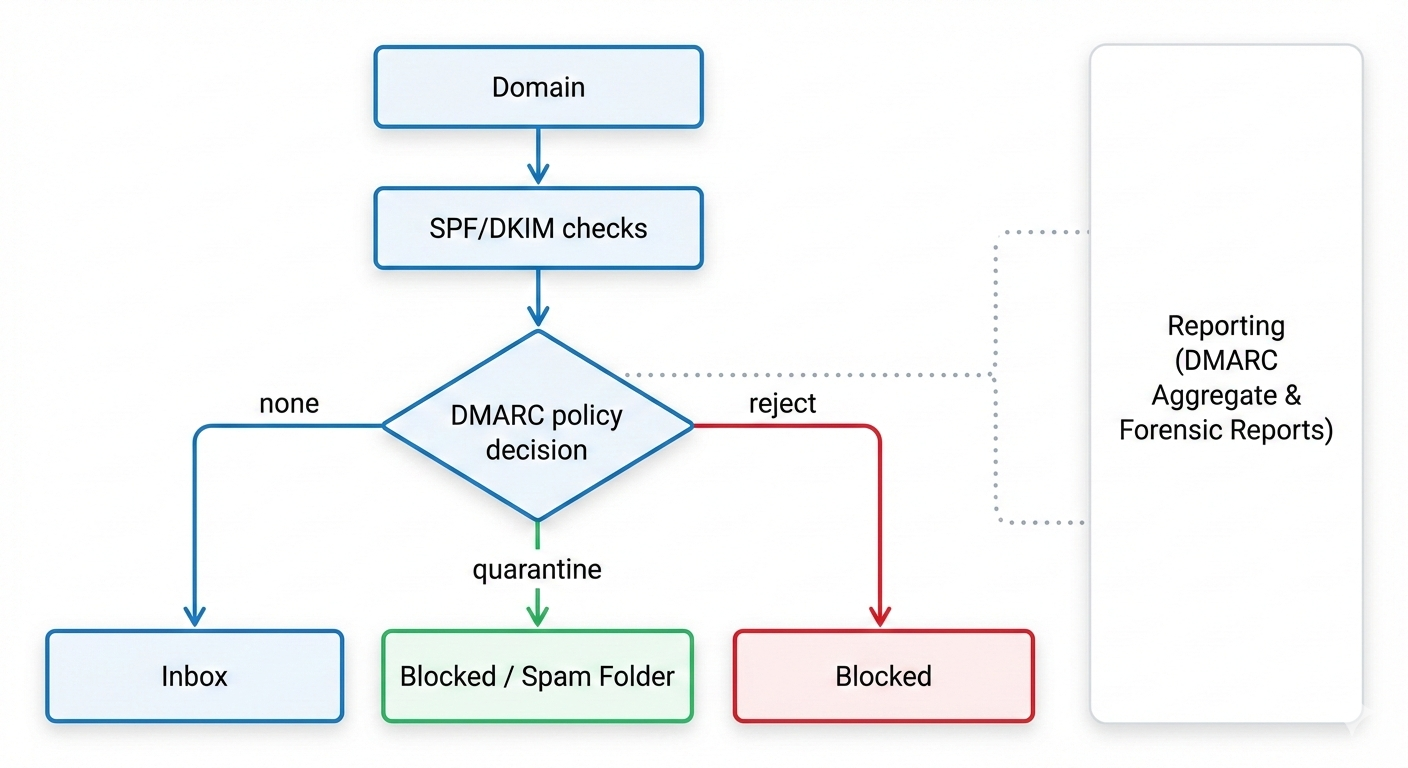
You’ll hear these three terms a lot:
- SPF: a rule that says which servers are allowed to send email for your domain.
- DKIM: a digital signature that proves the email wasn’t altered and is linked to your domain.
- DMARC: the policy layer that tells inbox providers what to do when SPF/DKIM checks fail, and sends you reports so you can see what’s happening.
If SPF and DKIM are the “locks,” DMARC is the “security guard” that decides what happens when someone tries the wrong key.
What White Arrow Technology does (without the jargon)
White Arrow Technology simplifies DMARC, SPF, and DKIM management and gives you visibility and control.
From White Arrow Technology’s own positioning, the platform is built for visibility, automation, and ease of use, with real-time insights, policy enforcement, and proactive threat detection.
Here’s what that means in day-to-day terms.
1) It helps you get DMARC set up correctly
DMARC is powerful, but the setup can be confusing.
A small typo in a DNS record can break things. A rushed “reject everything” policy can block legitimate systems (like CRMs, marketing tools, ticketing systems, or payroll providers).
White Arrow Technology cyber security email tools helps you implement DMARC in a controlled way, so you can move from “no protection” to “full protection” without accidentally disrupting business email.
2) It shows you who is sending email as your domain
Once DMARC reporting is enabled, you start receiving a lot of technical reports.
Those reports are valuable, but they’re not designed for humans.
White Arrow Technology turns that raw reporting into something you can actually use:
- Which services are sending email for your domain
- Which ones are legitimate
- Which ones are suspicious
- What’s failing authentication and why
That visibility is the difference between guessing and knowing.
3) It helps you enforce a policy that blocks impersonation
DMARC has different policy levels.
- none: monitor only (good for discovery)
- quarantine: suspicious mail goes to spam/junk
- reject: suspicious mail is blocked
White Arrow Technology cyber security email tools is designed to help you move toward enforcement so attackers can’t successfully spoof your domain.
4) It supports more than “just DMARC”
White Arrow Technology cyber security email tools also highlights related controls and add-ons that strengthen email security and trust, including:
- BIMI (email branding)
- MTA-STS and TLS-RPT (controls that help protect email in transit)
- Lookalike Domain Defense (monitoring for copycat domains)
- Breach Detection (monitoring sources like the dark web for compromised data)
You don’t need all of these on day one.
But it’s useful to know the platform is built around the bigger picture: protecting your brand identity in email.
Why this matters for small and mid-sized businesses
A common myth is: “We’re too small to be targeted.”
Attackers don’t pick targets based on size.
They pick targets based on opportunity.
And spoofing is cheap.
If your domain isn’t protected, you’re an easy option.
DMARC is one of the most practical security improvements you can make because it:
- Reduces successful impersonation attempts
- Improves trust with recipients
- Helps legitimate email land in inboxes
- Gives you reporting that reveals hidden risks
It’s not hype. It’s basic hygiene for modern business email.
How to test your domain (quick check)
If you want a fast, simple check, use this domain test link:
- Test your domain: https://app.whitearrowtechnology.com/sendmarc
This kind of test typically checks whether your domain has:
- A DMARC record
- SPF and DKIM alignment (where possible)
- Obvious configuration issues
If the result shows gaps, that’s not unusual.
Most domains have some authentication, but not enough enforcement to stop spoofing.
What “good” looks like (in plain English)
A well-protected domain usually has:
- SPF configured for every legitimate sending service
- DKIM enabled for the major systems that send mail
- DMARC enabled and moving toward enforcement
- Clear reporting so you can spot new senders quickly
The key idea is control.
You want to be able to answer one question confidently:
“Who is allowed to send email as us?”
If you can’t answer that, you can’t reliably stop impersonation.
Common mistakes that keep domains exposed
Even when businesses “have DMARC,” they’re often still exposed because of a few common issues.
Mistake 1: DMARC set to monitor forever
Monitoring is a great first step.
But staying on “monitor only” means attackers can still spoof you.
The goal is to move toward quarantine/reject once you’ve validated legitimate senders.
Mistake 2: SPF that’s too broad
Some SPF records are written in a way that effectively says: “Almost anyone can send.”
That defeats the purpose.
Mistake 3: DKIM missing on key systems
If your marketing platform, CRM, or support tool isn’t signing with DKIM, it may fail alignment.
That can block legitimate email once you enforce DMARC.
Mistake 4: No ongoing visibility
Email systems change.
A new tool gets added. A vendor changes infrastructure. A department signs up for a new platform.
Without reporting and monitoring, you only find out after deliverability breaks or an incident happens.
Who White Arrow Technology cyber security email tools is for
White Arrow Technology cyber security email tools is used by enterprises, governments, and SMEs, and it also has a tailored solution for MSPs and partners.
In practical terms, it’s a fit for:
- Businesses that want to protect their brand from spoofing
- Teams that need a clear dashboard instead of raw DMARC XML reports
- IT providers managing multiple customer domains
- Organisations that care about both security and deliverability
If you want to start: free trial link
If you’re ready to explore the platform, you can subscribe here:
- Subscribe / start: https://signup.sendmarc.com/partners/169763ba-0913-4450-9428-a26b9687a350
A simple next step (no drama)
If you do nothing else this week, do this:
- Run the domain test
- Confirm whether DMARC is present
- If it’s present, check whether it’s enforced or only monitoring
Email impersonation is one of those risks that feels abstract—until it isn’t.
The good news is you can reduce it massively with the right setup and ongoing visibility.
If you want help getting to enforcement safely (without breaking legitimate email), that’s exactly the kind of work White Arrow Technology cyber security email tools is designed to support.
No responses yet