
How to Identify an Impersonation Email (and What to Do If You’re Targeted)
Introduction
Imagine waking up, opening your inbox, and seeing a message that looks like it’s from Microsoft, your IT team, or even your own company. It’s urgent. It says you must act now. But something feels off. That’s not just a bad feeling—it could be the start of a cyberattack.
Impersonation emails are one of the scariest threats facing businesses today. They’re designed to trick you, steal your data, plant viruses, or even take over your entire system. The good news? You can spot them if you know what to look for.
What Is Email Impersonation?
Email impersonation is when a cybercriminal pretends to be someone you trust—like your boss, a partner, or a big company. Their goal is to get you to click a link, open a file, or hand over sensitive information.
Common tactics:
- Fake sender names and addresses
- Copying real company logos and signatures
- Creating panic or urgency (“Do this now or lose access!”)
- Links to fake websites or infected downloads
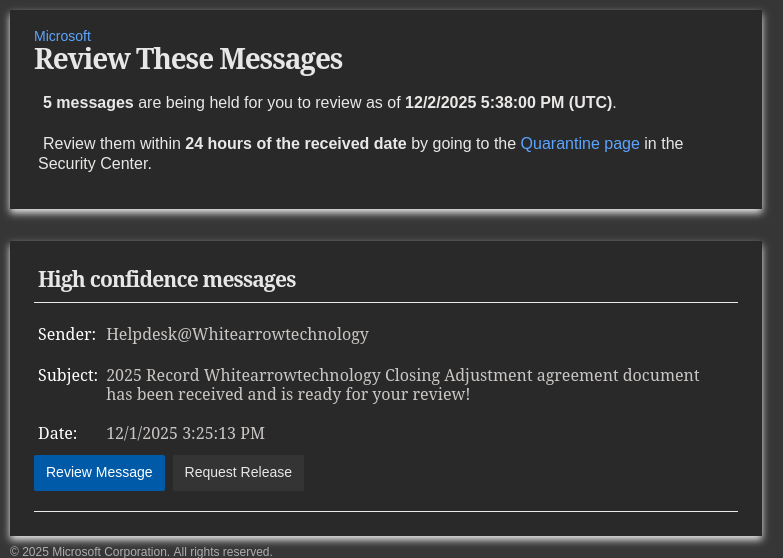
Real-World Example: The “Scary” Sales Pitch
Here’s how a real impersonation email might look:
Subject: 2025 Record Whitearrowtechnology Closing Adjustment agreement document has been received and is ready for your review!
Sender: Helpdesk@Whitearrowtechnology
Date: 12/1/2025
Action: Review Message | Request Release
The email tells you to review a document within 24 hours or risk losing access. It uses your company’s branding and even mentions Microsoft. But if you click, you could infect your computer with a virus or hand over your login details to criminals.
Red Flags in Impersonation Emails
- Urgency: “Review within 24 hours!” or “Act now!”
- Sender address: Looks almost right, but not quite (e.g., Helpdesk@Whitearrowtechnology, not your real IT address)
- Unusual requests: Click this link, download this file, or enter your password
- Generic greetings: “Dear User” instead of your actual name
- Strange links: Hover over them—do they match the sender’s company?
How to Spot an Impersonation Email
1. Check the Sender’s Address
Look for spelling mistakes, extra numbers, or addresses you don’t recognize.
2. Look for Urgency and Threats
If the email tries to scare you or rush you, be suspicious.
3. Hover Over Links
Move your mouse over any link (don’t click!) and see where it goes. If it looks odd, don’t touch it.
4. Watch for Attachments
Never open files from someone you don’t know or weren’t expecting.
5. Branding Issues
Bad grammar, weird logos, or off-brand colors are big clues.

What To Do If You Suspect an Impersonation Email
- Don’t click links or download files.
- Don’t reply to the sender.
- Report it to your IT department or security provider.
- Delete it if you’re sure it’s a scam.
The Real-World Risk for your domain
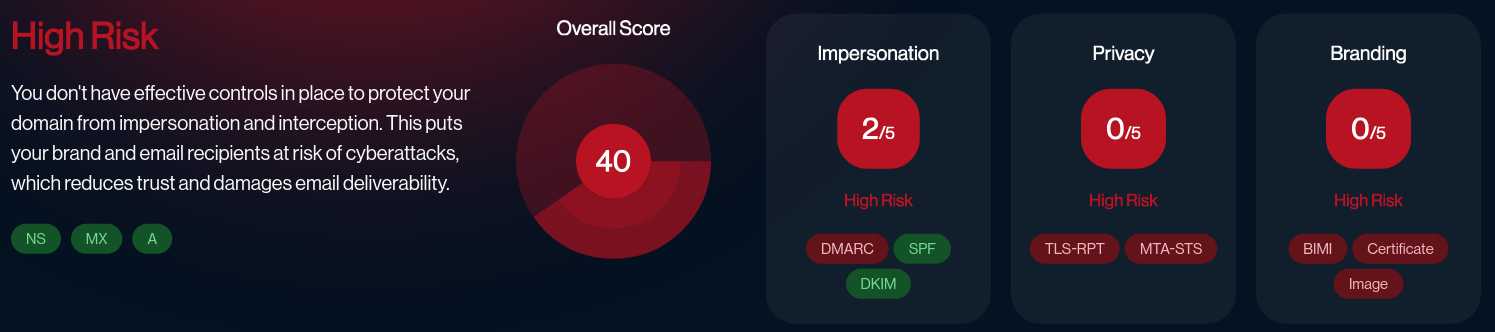
Check your email score: link
Your domain score is High Risk:
- Impersonation Rating: 2/5
- Privacy Rating: 0/5
- Branding Rating: 0/5
- Overall Score: 40/100
What does this mean?
- Criminals can easily impersonate your business.
- Real emails might end up in spam.
- Your brand and clients are at risk.
- Email privacy is weak—messages can be intercepted.
- Your emails lack branding, so clients can’t tell if they’re real.
How to Fix It: Get Expert Help Now
White Arrow Technology is here to help you lock down your email security—fast.
What we do:
- Set up DMARC, SPF, and DKIM to stop email spoofing
- Enforce strong encryption (TLS, MTA-STS) for privacy
- Add branding (BIMI) so your emails stand out as real
- Monitor for threats 24/7 and alert you instantly
- Train your team to spot and report phishing
Don’t wait until you’re the next victim.
Scary Sales Pitch: A Real Email Example
Subject: 2025 Record Whitearrowtechnology Closing Adjustment agreement document has been received and is ready for your review!
Sender: Helpdesk@Whitearrowtechnology
Date: 12/1/2025
Action: Review Message | Request Release
This looks official—but it’s a trap. Clicking could infect your computer or steal your login details.
What You Should Do Next
- Review your email security settings.
- Contact White Arrow Technology for a free risk assessment.
- Educate your team—share this post!
Protect Your Business Today
Impersonation emails are scary, but you don’t have to face them alone. With the right security controls and expert support, you can stop attacks before they start.
Need help fixing your domain security?
Contact us at or visit whitearrowtechnology.com for expert support.
Source
Compiled from real-world security assessments and White Arrow Technology expertise.
Stay safe. Stay proactive. Don’t let cybercriminals make you their next victim.
No responses yet